Install Recovery Toolbox for Project on your computer
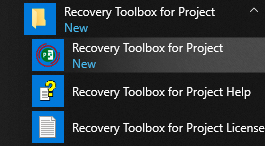
Start Recovery Toolbox for Project
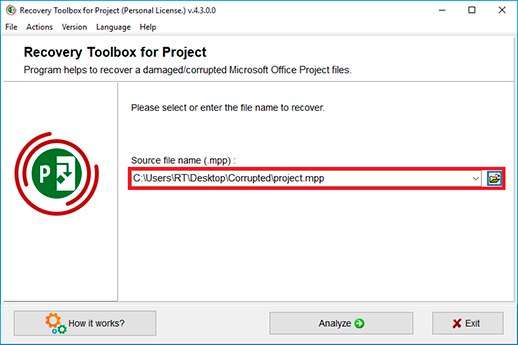
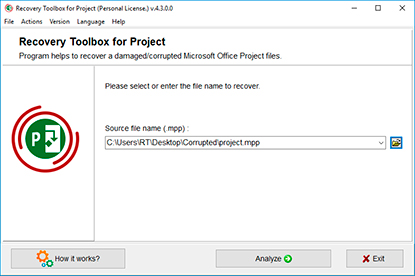
Please select a damaged Microsoft Project *.mpp file
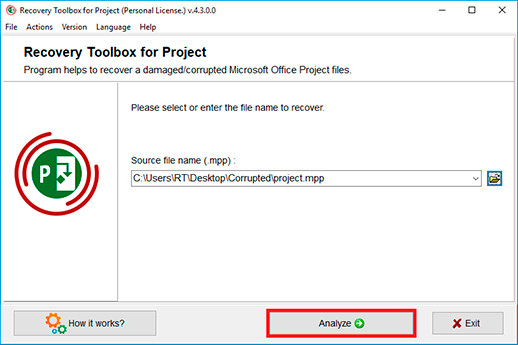
And click the Analyze button
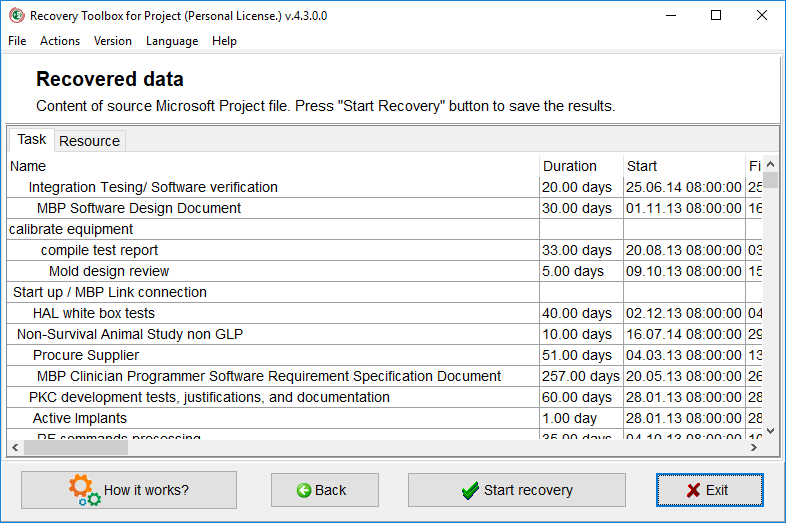
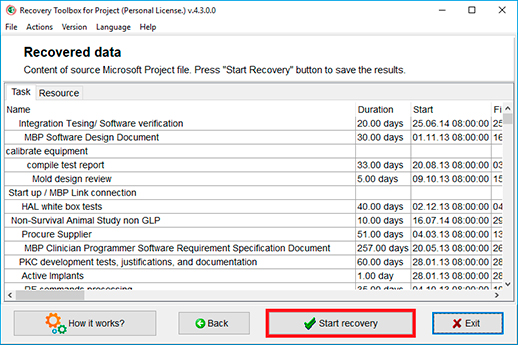
Content of source Microsoft Project file. Press Start Recovery button to save the results
Microsoft Project Repair Tool
Recovery Toolbox for Project was developed for the repairing of information from corrupted .MPP files. The MS Project Repair Tool reads information from corrupted files in Microsoft Project (any version) and exports the recovered data to a new file.
First, download and install Recovery Toolbox for Project. Once you have started Recovery Toolbox for Project, select a corrupted .mpp file from your device or computer and then press the Next button. The corrupt Microsoft Project file recovery software shows all possible records for restoration on page 2 of the recovery wizard.
The MPP Repair Tool is useful after a power failure, hardware malfunction or a virus attack, or in the event of a problem due to a user error or ignorance of the basic data-protection rules.
How to repair MPP file
Features of the MS Project File Repair Tool:
Supports the repair of data from Microsoft Project files in all versions, including Project 2000, 2003, 2007, 2010, 2013, etc.
Exports repaired data directly into Microsoft Project
Easy to use, featuring a friendly program interface
Compatible and successfully tested under Windows 98, NT 4.0, 2000, Me, XP, Vista, 7, 8, 8.1, 10 and 11
Multi-language program interface with 14 main languages
MPP Viewer Tool
Viewer for damaged data files of Microsoft Project
Shows and recover corrupted *.mpp files
How to recover MS Project file corrupt
The interface of Recovery Toolbox for Project is based on the concept of a multi-step recovery wizard that requires minimal involvement by the user. Just follow the easy on-screen instructions provided for each step, and Recovery Toolbox will do the rest.
Free MPP File Viewer
Recovery Toolbox for Project is very convenient to use for viewing the contents of MPP files of Microsoft Project - damage, standard, or both Project file. The tool can work as a viewer for MPP files even if you don't have Project or Microsoft Office installed. The tool allows you to open and view any MPP files for an unlimited number of times, study the data of each task, and more.
Recovery Toolbox for Project implements a preview of Project tasks in the form of a table where all the properties of tasks from the Microsoft Project are displayed. The tool opens MPP files for viewing, even if they are damaged. Plus, it's free for an unlimited number of times.
By clicking Download or Repair Online, you agree to the Terms of Service and EULA.
Recovery Toolbox for Project
How to open a corrupted MPP File for free
Recovery Toolbox for Project allows you to open a damaged Microsoft Project file for free and display all the data from the damaged MPP file on the preview page.
How to restore the Project file
To restore a damaged Microsoft Project file, you can use the last backup or go back to the previous stable copy of the file, or try to use Recovery Toolbox for Project. With a very high probability, Recovery Toolbox for Project can recover data from .mpp files to their original state before they are damaged. To verify this statement, it is necessary to:
Download, install, and run the DEMO version of Recovery Toolbox for Project.
Select a damaged .mpp file.
Run the analysis of the damaged MPP file.
Review the restoration project tasks on the preview page.
Export restored data to a new Microsoft project - available in the full version.
How to fix the Project file
If you need to fix a damaged Microsoft Project file, then the full version of Recovery Toolbox for Project will allow you to do this in a few simple steps. Fixing Project files occurs by copying the corrected data from the damaged .mpp file to a new project. Fixing a project requires a desktop version of Microsoft Project installed. The tool doesn't fix or modify the existing MPP file. All recovered data transfers to a new project. Revised data from a damaged MPP file can be exported to a new project only in the full version. Revision of the project doesn't require specialized knowledge in IT. It's enough to have a regular Windows user skills.
Practical comparison of Microsoft Project (MPP) recovery tools: methodology, participants, conclusions
We regularly conduct applied testing of programs and web services for recovering damaged Microsoft Project files (MPP format). The main goal is not to set laboratory records, but to understand how the tools behave on real damaged project files: where they succeed, where they fail, and what can be improved in our own solutions. We repeat the tests 1-2 times a year to see the dynamics.
Where do the test files come from?
The basis is always a real user sample: MPP files that have been damaged due to save failures, sudden closure of the Project, storage device damage, or the effects of viruses. We take everything that customers have uploaded to the cloud-based project recovery service (https://project.recoverytoolbox.com/online/), without filtering or smoothing it, so that the conditions are as close to real life as possible. In one cycle, we analyse at least 200-400 projects of different versions, sizes, and types of damage.
SecureRecovery® for Project (also available as an online service).
Built-in Microsoft Project Open and Repair feature (Project for Microsoft 365).
Summary of results
The table below shows the percentage of successfully recovered files, approximate prices, and brief comments. This is not a synthetic test, but a summary of real cases with varying degrees of damage.
The Recovery Toolbox online service displays stable average survivability for various types of damage and is convenient when speed of launch without installation is crucial.
The desktop version of Recovery Toolbox for Project (Windows) has historically been stronger on heavy files due to its local access to system resources and the absence of download size restrictions.
OnlineRepair/Project Repair Kit, along with OnlineFileRepair.com, forms the middle of the table — a practical backup option, especially if one service fails and a rescan with another tool can still retrieve the task structure.
SecureRecovery is a targeted tool: its cost is comparable to the price of recovering a single file using online services, making it economically sensible for a stream of tasks rather than a one-off attempt.
Open and repair in Project — first aid: fast, free, but adequate mainly for minor damage to headers/structure; usually insufficient for severe data corruption.
Brief testing methodology (extended)
Raw case flow: we take all files downloaded over several months without preliminary selection — this way we avoid tailoring to the tool.
Variety of versions: from old to current MPP.
Types of damage: from won't open to point damage to connections.
Unified run: each tool processes the same pool.
Metrics collection: percentage of successful cases, integrity of tasks/resources/dependencies, time spent, and cost.
Summary table: final assessment with comments.
How to choose a tool for your damaged MPP file recovery scenario
First, try the built-in feature (Open and Repair) — it's free and fast; if that doesn't help, move on to external tools.
An online service is beneficial if you don't have the right/ability to install software, if you are using macOS/Linux, or if you are dealing with minor to moderate damage.
The Recovery Toolbox for Project desktop utility (Windows) is preferable for large files, complex structures, and when fine-grained processing is required.
Iterate with different solutions: failure of one service does not mean that the data is lost — different engines parse damage differently.
Step-by-step recovery algorithm (practical guide)
Make a copy of the damaged MPP.
Try Open and recover in Project (it's fast and free).
If that doesn't help, run the file through the Recovery Toolbox online service; if that fails, try alternative online solutions.
For complex cases and large files, use desktop utilities (start with Recovery Toolbox for Project).
If you manage to partially restore the structure, export the tasks/resources to a new, empty project, and then manually fix the links.
Conclusion
Really damaged MPP files show that there is no universal rescuer: different tools cope with varying types of damage in various ways.
In practice, the sequence built-in function → online service → desktop utility → alternative engines gives the highest probability of recovering data.
The economics of choice are determined by the balance between one-time needs and task flow: online services are convenient for one-off cases, while desktop licenses are more suitable for regular work.
Requirements:
Windows 98/Me/2000/XP/Vista/7/8/10/11 or Windows Server 2003/2008/2012/2016 and above
Installed Microsoft Project
Note:Recovery Toolbox for Project does not repair content of password-protected Microsoft Project .mpp files.
Recovery Toolbox for Project helps repair MS Project files and fixes many errors in those files. Here are some example messages for which Recovery Toolbox for Project can provide a solution:
An unexpected problem occurred while opening the file. The file may be damaged. Try using a backup copy.
Project cannot recognize this file format. Do you want to open this file as text only?
By clicking Download or Repair Online, you agree to the Terms of Service and EULA.
Recovery Toolbox for Project
Video:
Online help:
Recovery Toolbox for Project (Download) is a specialized tool intended for recovering tasks and task-related data from damaged Microsoft Project files (*.mpp). The program has an extremely simple and self-explanatory interface based on the concept of a multi-step wizard, which enables users with little to no experience to restore their project data within minutes. All you need to do is follow the instructions on the screen and the program will take care of the rest to recover your data.
If Recovery Toolbox for Project cannot recover data in the automatic mode, you can resort to the Send source file command from the main program menu. The currently opened file will be attached to a new email message (the default email client will be used) and sent to the developers of the program. Once the file is received by the company's customer service department, they will try to recover your data and will use this opportunity to improve the program's recovery algorithms. You will be contacted as soon as possible with an update on the results of their effort.
Please note that Microsoft Project MUST be installed on your computer for the program to finish the recovery process and restore your data. A typical recovery process consists of several simple steps described below.
The step-by-step manual for Recovery Toolbox for Project
The first step of the wizard allows you to select the damaged file you want to recover data from. This can be done in one of the following ways:
By entering the name of the file and its path into the input field located in the center of the program screen;
By using the standard dialog that can be opened by clicking an icon to the right of the input field;
By selecting one of the previously used files from the dropdown list that can be opened by clicking a small button with a downward arrow in the right part of the input field.
Once the file has been selected, you can proceed to the next step by clicking the Analyze button. The program will ask whether you really want to proceed and, if the answer is affirmative, will load the next screen of the recovery wizard.
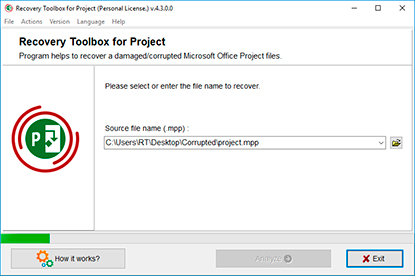
This step of the wizard is fully automated. First, Recovery Toolbox for Project will take some time to analyze the structure of the file and attempt to identify recoverable items within it. The duration of this process depends on the complexity and size of the file being recovered and the speed of your computer. Once recoverable items have been identified, the program will show them in a table. The table will contain the names of identified tasks, as well as their durations, start and finish dates, predecessor IDs and associated resource names. Once you have reviewed the table, you can proceed to the third (final) stage of the recovery process by clicking the Start recovery button at the bottom of the screen.
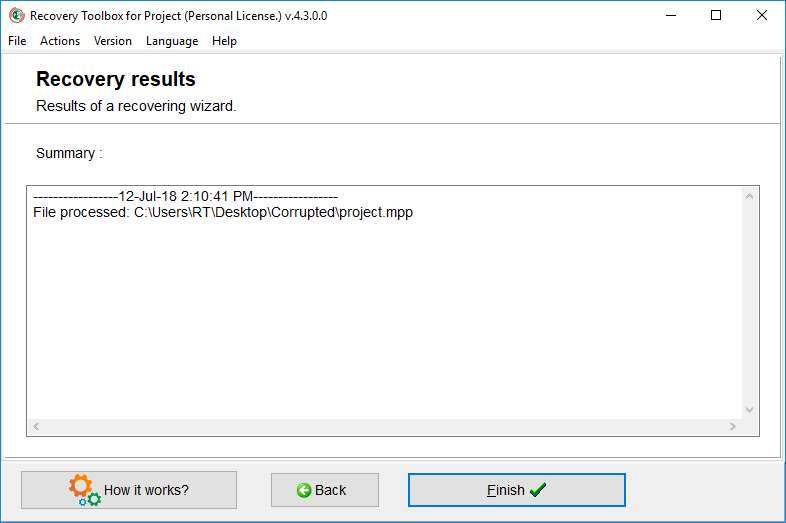
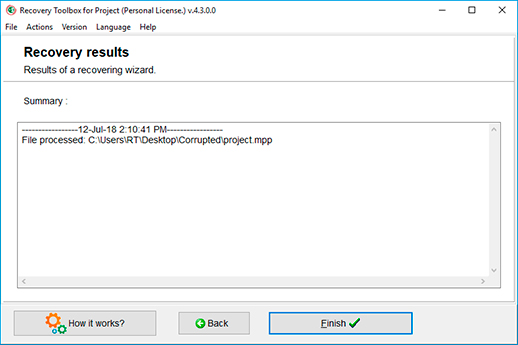
At the final step of the recovery process, the program actually recovers the data from the damaged file and sends it to Microsoft Project, so you can immediately edit your project and save it to a safe location.
You can finish working with the program by clicking the Finish button. If you want to recover data from another file, use the Back button to go back to the first step - file selection.
As you see, using the program is very easy and straightforward. Should you have any problems with the program, please don't hesitate to contact our support department.
An email with a registration code and instructions for activating this code will be sent to the user immediately after the payment confirmation.
An email with a registration code will be sent from several different mail servers to prevent messages from appearing in SPAM filters. Accordingly, a possible duplication of registration letters received in the user's mailbox.
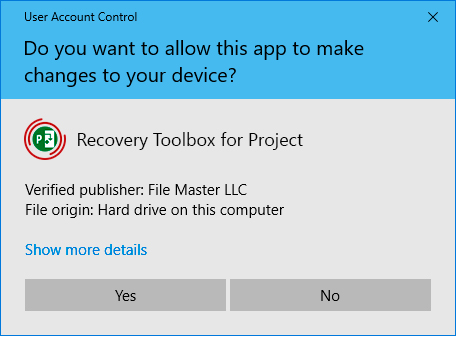
To activate the registration code, you need to run the application in Windows under a user with Administrator rights.
The number of Personal, Business or Site licenses activated simultaneously must not exceed the number of purchased licenses.
We sell software via registration services PayPro Global and Noventiq. That is why not Recovery Toolbox, but the corresponding company will be specified in the payment documents.
The purchased registration key is valid for all 4.x versions of Recovery Toolbox for Project.
PayPro Global (PayPro Global, Inc., 250 The East Mall street, Etobicoke, ON Canada, M9B 0A9) is the fastest growing eCommerce company that develops customized solutions to help software producers to easily and effectively sell software online. PayPro Global supports more than one hundred currencies, all major credit cards, and a wide variety of payment options. PayPro Global offers efficient customer support 24/7 and provides personal attention to customers having special requirements.
Noventiq online store for licensed software opened in 2004. Noventiq offers customers over 15,000 programs from 3,000 developers, provides fast delivery (electronic and physical), accepts 20 payment methods, and includes a cumulative discount system. Noventiq specialists provide customers with all the necessary advice for purchasing licensed software. Selling software is our profession!
Reasons to Buy Recovery Toolbox for Project Full Version
The benefits of buying the full version of Recovery Toolbox for Project, allowing you to repair corrupted .mpp files used in Microsoft Project, compared to the free version:
Enhanced Recovery Capabilities:
Deeper Corruption Repair: The free version might have limitations on the complexity of corruption it can address. The full version likely utilizes more advanced recovery algorithms, increasing the chances of salvaging the maximum data possible from your project schedule.
Complete Project Recovery: The free version might only recover a limited portion of the project data. The full version may allow recovery of various crucial elements, including:
Tasks and Schedules: Recover the tasks, dependencies, and timelines that define your project plan.
Resources and Assignments: Restores information about assigned resources and their roles within the project.
Notes and Attachments: Recover any notes or attachments associated with tasks for crucial project information.
Usability and Functionality:
Preview Recovered Project: The full version might offer a preview functionality. It lets you see how the recovered project data looks before saving, ensuring it accurately reflects your original plan and meets your needs before committing to the recovered file.
Detailed Recovery Reports: The full version might provide detailed reports on the recovery process. These reports can offer insights into the type of corruption encountered and the success rate of the recovery for different elements within the project data.
Additional Considerations:
Technical Support: The full version might come with access to technical support from the software developer. It can be invaluable if you encounter any issues during recovery or have questions about using the software.
Free Updates: Purchasing the full version might entitle you to receive free updates for a specific period. These updates can include bug fixes, compatibility improvements with newer Project versions, and potentially even enhanced recovery capabilities.
While the free DEMO of Recovery Toolbox for Project can analyze corrupt .mpp files and show you a glimpse of the recoverable data, its most significant limitation lies in its inability to export the recovered information. Here's how the full paid version bridges that gap:
Export and Save Recovered Project Data:
The Crucial Advantage: The free DEMO might allow you to analyze the corrupt project file and preview some recovered data, like task lists. However, the full version grants the essential ability to export and save the recovered data as a usable Microsoft Project file (.mpp format). It allows you to integrate the recovered project schedule into Microsoft Project and continue working on your project plan.
Maintaining Project Structure: The full version might ensure the recovered data retains the original project structure, including:
Task Hierarchies: Preserves the parent-child relationships between tasks, maintaining the overall workflow of your project.
Dependencies: Recovers the dependencies between tasks, ensuring the project plan remains logically sequenced.
Resource Assignments: Exports the information about assigned resources and their roles within the project.
Benefits of Saving Recovered Project Data:
Project Continuity: By exporting and saving the recovered data, you can get your project back on track. You will retain valuable planning efforts due to file corruption.
Detailed Editing and Refinement: Once saved as a usable Microsoft Project file, you can edit, refine, and fine-tune the recovered project schedule within the familiar Project environment. It allows you to make necessary adjustments based on the recovered data's accuracy.
Peace of Mind: Knowing you can recover and save your project data offers peace of mind, especially when dealing with critical project plans containing vital information.
The advantages of the registered full version of Recovery Toolbox for Project for Windows compared to the online version (Recovery Toolbox for Project Online) for recovering corrupt Microsoft Project files:
Full Version (Windows):
Potentially Higher Recovery Success: The full version might employ more powerful recovery algorithms due to its dedicated software installation. It could lead to a higher chance of salvaging complex or severely corrupted project files.
Offline Recovery: The full version works independently on your Windows PC without relying on an internet connection. It can be beneficial for:
Large Project Files: Uploading and downloading large project files through an online service can be time-consuming and eat into your internet data allowance.
Sensitive Data: If your project contains confidential information, you might prefer to keep the recovery process offline for security reasons.
Online Version (Recovery Toolbox for Project Online):
Device Agnostic: A significant advantage of the online version is its accessibility. It works on any device with a web browser, including phones, tablets, and MacBooks. It allows you to recover project files regardless of your operating system or device limitations, which is especially useful if you don't have a Windows PC.
No Microsoft Project Installation Required: You don't need Microsoft Project software installed on your device to use the online service. It can be helpful if you need access to Microsoft Project or prefer not to install additional software.
Faster for Minor Corruption: The online version might offer a quicker solution for minor corruption issues as there's no software to download and install.
Potentially Lower Cost: The online version might have a different pricing structure than the full version. In some cases, it could be a more cost-effective option for occasional use.
Choosing Between Them:
The severity of Corruption: If the project file is severely corrupted, the full version's potentially more powerful recovery algorithms might be a better choice.
Accessibility Needs: If you need recovery options from various devices without being limited to a Windows PC, the online version offers superior accessibility.
Data Security Concerns: If your project contains sensitive information, consider the security implications of uploading the file to an online service. The full version's offline recovery might be preferable in such cases.
Frequency of Use: Consider how often you need to recover project files. If it's a rare occurrence, the online version's potential cost advantage and accessibility might be more appealing. For frequent use, the full version's features and potential for higher recovery success could justify the investment.
FAQ-Wiki:
Question:
Project Recovery not working?
Answer:
This problem may happen when you have installed the Microsoft Project but did not run it or the Microsoft Project is installed under another user record.
Please try to run the software as administrator: To run the software as administrator you can click with the right mouse button to the program icon and choose run as... or run as administrator popup menu item.
Question:
The program Recovery Toolbox for Project detected and displayed data from the damaged .mpp file. But after clicking the Start Recovery button, the data is not exported to Microsoft Project
Answer:
To correctly export recovered data from Recovery Toolbox for Project to Microsoft Project, it is necessary that:
Recovery Toolbox for Project and Microsoft Project were installed under the same Windows user account on the computer
The current Windows user account has been included in the Administrators group. Adding the current user to the Administrators group must be done before installing both programs under this account
Recovery Toolbox for Project should run under the Windows user account that was used to install Microsoft Project
Specialist in storing projects in Microsoft Project files. Expert in recovering corrupted Microsoft Project MPP files with 20 years of experience.
Customer's reviews and ratings:
Rakesh 08-10-2026
This is very useful
Faizu 06-21-2026
Very good
HH 11-15-2025
Its done a excellent job.
Lavan 06-30-2025
A very important document(PHD thesis) got corrupted that I had saved on Microsoft sharepoint. While all microsoft tools failed to recover or at least open a previous version, this tool helped me to open some of its content. While the document is not 100% recovered, it has the content I need so I can use what I need and complete the thesis. Thank you!!!!!
Jaggu 05-09-2025
Great Software
ALOK KUMAR 03-02-2025
VERY GOOD
Ejaz 12-16-2024
Excellent
oscarocando 12-08-2024
Thanks! You've saved my life!!! You're the greatest!!! Thanks!
KychardGiraud 02-26-2023
The names of the tasks are not restored. Everything else is in place and accurate.
Jazlyn Koch 04-06-2021
The logistics company project planning has been revised. It is a pity that some of the tables had to be filled in again.
Gabriela Harris 03-15-2021
Thank you, not completely of course, but you can work.
Ruckusron800 02-15-2021
Guys you have a very strange captcha, I could not enter it correctly, and I was banned for 4 hours, I had to download the offline version of the program and ask the accountant to pay the license $27
Brooks Cohen 01-21-2021
Microsoft Project has been fixed. In the grant diagram, I noticed the line placement is fails. My critical lines were not marked in red, but in blue (as if these are additional).
Sinapise 12-23-2020
Special thanks for the professional support, we explained in great detail step by step how to fix a damaged .mpp file (MS Project 2007) on Windows XP.
Kenzo Nico 12-07-2020
I'm already tired of struggling with MS Project, because of the constant increase in the size of individual files in the main project! Opening the main project is a complete fight against persistent Microsoft Project crashes that take 5 minutes to open or save. We still haven't found a solution to this problem, but your program helped a little to fix the file bloat error. Now we use the program once a month, when the file becomes large, it helps a lot.
Memphis Fletcher 08-04-2020
A couple of days ago, the situation was sad, my plan and the backup of this plan welled up so that Microsoft Project stopped opening them. It is also not only .mpp files, but also .xlsx, .pdf, and .docx. As they eventually explained to me, this could be caused by the fact that some sectors in the HDD were damaged. I want to express my deep gratitude to the sales manager for understanding my problem and for those coupons that she gave me! The program turned out to be quite easy to use, it just alarmed the speed of file repair, which is why I decided to call support.
Toadstool 07-20-2020
Steps to keep large Microsoft Project files from corrupting - don't use MS Project!! I already fixed the file on this service, but six months later this damn MS Project decided to add itself to my plans again! WTF! How long can you break? I regret two things, that I use Project, and last time I used online repair instead of buying the program
SynetivNoggin 06-22-2020
After extract data from corrupted Microsoft Project file, my tasks that have entered recover file, lost their position in task scheduler and durations, because they had media files.
KlmeeDroll 06-08-2020
At first, the schedule in MS Project opened without errors, but in the "Read Only" mode. After several changes, my .MPP file won't open. A message appears stating that the file is corrupt or a compatibility issue. After restoring the .MPP file, my information in it was changed - some tasks were restored without duration.
Searkern 04-13-2020
I was not able to open .MPP MS Project 2007 with 2010, it says Project cannot open the file. I restored the .MPP file online, there was no problem restoring the ms project file. The whole plan of my remote work was restored. #STAYHOME
Buzzer 03-02-2020
I extracted some data from the MS Project schedule and the file became damaged. I recovered a corrupt ms-project file successful, but some task lost duration.
presure_the_guide 02-20-2020
I put 4 stars because you did not write on the How it works page that the program must be run as administrator in order to recover a corrupted Microsoft Office Project file, which showed an error when opening "the file is corrupted" in MS Project 2010
Ammy 10-25-2018
Good service. Software didn't tried.
Den 10-25-2018
My PC slept and Project broked. Service can repair it for $10
Andrew 10-25-2018
My 2013 project .mpp file has been repaired. But part of the “Task Names” was lost.
We use cookies. By clicking Accept All, you consent to our use of cookies.
Cookie Policy